Good GPS/Map units.

> 10 years ago
Reply
Register to post, see what you've read, and subscribe to topics.
whiteout
whiteout
QLD
269 posts
QLD, 269 posts
7 Feb 2012 6:38pm
Can anyone advise which Gps/Map units they have found to be reliable I have a small H20 lorance and wish to upgrade. Advice please.
Charriot
Charriot
QLD
880 posts
QLD, 880 posts
7 Feb 2012 8:27pm
I use nearly 3 years Garmin 550 color witch ECHO and all AUS & NZ charts build in.
Recently tested 7 inch Lowrance, tons of features but,
I am till happy with mine, solid reliable unit.
Agent000
Agent000
161 posts
161 posts
7 Feb 2012 9:48pm
iPhone No joke check out navionics on someone's iPhone $14.95 and as good as any chart plotter ( that's if yor eyes are ok otherwise get an iPad) stick it in a waterproof cover and you are set

Fraction of the price ( if you need a phone anyway) and you can check sea breeze for the weather too
Charriot
Charriot
QLD
880 posts
QLD, 880 posts
8 Feb 2012 6:37am
Agent, they great,but my understanding is
you pay for excess to charts.
You need ethernet connection and charts are downloaded as need it
Charts are not on your ipod.
Are charts for iPad available?
MichaelR
MichaelR
NSW
862 posts
NSW, 862 posts
8 Feb 2012 12:38pm
Charriot said...

Agent, they great,but my understanding is
you pay for excess to charts.
You need ethernet connection and charts are downloaded as need it
Charts are not on your ipod.
Are charts for iPad available?


I use the Navionics on my iPad. It's actually pretty good. The application is about $60 and you download the maps you need for free. They are stored on the iPad and you can remove them and add new ones if you need to. I have the whole East Coast at the moment from Gabo to Cape York, not that I'll need that much. You need a GPS enabled iPad, you don't need any wi-fi or internet connection to run the Navionics, only to download the app and new maps or use the favourites or wind prediction functions.

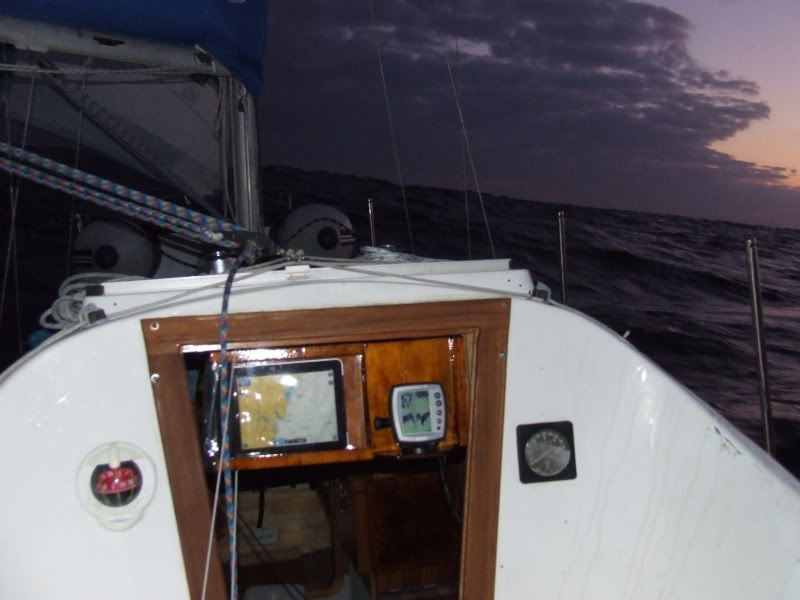
I also put it in a waterproof map holder that I got from Whitworths, then mounted it in a purpose built swing away panel with the sounder. You can This is from a recent trip to Lake Macquarie from Pittwater at sunrise. About 4 nm off The Entrance, Central Coast NSW.


If you have a power supply for your iPad to your car you can power it from the boat in the same way, and if you have a stereo system you can connect your itunes to it as well, so the iPad becomes multifunctional.

If anyone is in Pittwater this weekend and wants a demo, I'd be happy to hook up.

DISCLAIMER - Please don't rely solely on any electronic machine for navigation, always double check with paper charts.
Michael
MorningBird
MorningBird
NSW
2711 posts
NSW, 2711 posts
8 Feb 2012 5:12pm
I've played with the Navionics on my iPhone and while it is great it doesn't have the features of my Garmin 276C chart plotter. My recommendation is use a laptop so you can see grib files etc. The Garmin 276C is integrated in to the tiller pilot, instruments etc and can also be mounted on the coach house running on its batteries so that I can navigate directly off the chart.
While I now use the plotter as my primary nav I always have the chart as a backup.
drpete
drpete
55 posts
55 posts
8 Feb 2012 2:32pm
I downloaded Navioncs for Android onto my HTC Desire ($13.70 one off charge) and have never looked back. Used it to get from Mooloolaba to Lady Musgrave and back in my 37ft cat (including the great Sandy Straits at night) and never missed a beat. I used paper charts to check position all the time, but if Navionics said there was a beacon coming up, you better believe there's a beacon coming up. Never let me down. And no, there's no data charge as it just runs off GPS (I used it a long way out of phone range so I can vouch for that) and the updates are free. It's VERY good.
Petey
Charriot
Charriot
QLD
880 posts
QLD, 880 posts
8 Feb 2012 8:20pm
Great update, thanks guys,
I have HTC Desire but didn't bother, just too small.
I like Micheal's IPad, 10" would be just right for me.
Ramona
Ramona
NSW
7757 posts
NSW, 7757 posts
9 Feb 2012 8:59am
Charriot said...

Great update, thanks guys,
I have HTC Desire but didn't bother, just too small.
I like Micheal's IPad, 10" would be just right for me.


10" is a bit small. I use a 16" wide screen laptop mounted on the chart table with Seaclear and digital charts. I can navigate from my normal sitting position in the cockpit [tiller] and read the screen easily.


Next time I upgrade it will be to a dedicated 12v computer driving a 22" lcd screen mounted vertically at the chart table using Seaclear
cisco
cisco
QLD
12365 posts
QLD, 12365 posts
9 Feb 2012 11:37am
You certainly swear by Seaclear Ramona.

I did download and install it on my PC and found the interface user friendly. Certainly more so than C-Map4.

As I understand it Seaclear only works with raster charts (scanned paper charts) and not vector charts (digitally generated charts).

Is that the case?

It occurs to me that if one was setting up nav electronics for coastal work a base line would be a DSS capable VHF radio with an active GPS antenna so that Lat/Long readings can be taken off the radio display and plotted onto a paper chart and that this would kept as a stand alone system.

This I am sure could be done for well under $1,000. Maybe as little as $500.

Then the ships nav capabilities could be enhanced with computer based chart plotting (very economical) or a dedicated chart plotter costing whatever you are willing to pay.

The DSS VHF with GPS antenna has got to be the way to go. I think it is now possible to buy such a radio with an integrated GPS receiver.
Ramona
Ramona
NSW
7757 posts
NSW, 7757 posts
9 Feb 2012 6:39pm
cisco said...

You certainly swear by Seaclear Ramona.

I did download and install it on my PC and found the interface user friendly. Certainly more so than C-Map4.

As I understand it Seaclear only works with raster charts (scanned paper charts) and not vector charts (digitally generated charts).

Is that the case?


Raster charts yes. I use Admiralty digital charts although you can scan paper charts if you want. The trouble with scanned paper charts is the texture of the paper is visible when zoomed right in and you also have same problem of inaccuracy you have with paper charts. Maritime services in NSW or whatever they are called this week, have charts available for all the areas in NSW in plasticised paper form for sale. Or you can download the PDF versions for free, convert from PDF to a BMP file and then you have an extremely accurate chart for Seaclear. The only spoiler is they have put lifejacket warnings on the charts in silly places spoiling some charts. The chart for the Shoalhaven river for example is extremely accurate, I can park alongside a green buoy and that's exactly where I will be on the chart. The admiralty chart for the same area will show the boat up on the land!
If your looking for a laugh read the accuracy adjustments required on a paper chart like AUS 808 to allow for satellite navigation. How can there be a difference between paper lat and long and Gps? I got a distinction in Pussers SGCE[or whatever it was called] navigation, astro and coastal and it does not make sense to me.

The new Gps puck I bought a few weeks ago was only $29 off eBay including postage. This unit has 44 channels and twice the sensitivity of the older BU353 units. It locks on instantly even through the steel roof on my house, something a Garmin can't do. Pucks are now available with their own AAA battery and a small lcd screen that shows lat and long all the time if your wanting to shut down your laptop.
Seaclear will run AIS too if your into that.
MorningBird
MorningBird
NSW
2711 posts
NSW, 2711 posts
9 Feb 2012 7:55pm
Graham,
The chart versus GPS accuracy problem is that the chart is to a different datum, or projection, than the WGS84 datum that GPS uses. A number of earlier charts have this problem which is often only a few metres but has been known to be measured in miles. I believe that Middleton or Elizabeth Reef north of Lord Howe is a few miles out on some charts compared to the actual GPS lat long.
It is a real issue so should be checked when using charts you are not familiar with.
Many charts have a fix marked to check GPS positions against the chart, the chart with Pittwater on it I believe is one of them, I don't have it here to check.
Cheers
John
Karsten
Karsten
NSW
331 posts
NSW, 331 posts
10 Feb 2012 1:09am
cisco said...


The DSS VHF with GPS antenna has got to be the way to go. I think it is now possible to buy such a radio with an integrated GPS receiver.


Indeed, two such VHF's currently advertised in Australia are:
- Standard Horizon HX580/HX581 (seen at $340)
- Lowrance LHR-80 (seen at $245; very good price; is the Lowrance brand any good?)

This thread is very timely for me; I am just about to buy a new VHF and GPS.

My first thought was a Garmin handheld with mapping capability. Really attractive to have a small, independent device that is not installed or part of the boat, so it can be used in the cabin, cockpit or at home.

But two things discourage me:

a) You have to buy Garmin-specific electronic charts to load them into the handheld (eg. to buy topographical maps used by bushwalkers etc. costs about $170). Don't know how many marine charts you have to buy for Aust east coast. But they will be Garmin-specific; so if you ever change GPS equipment brand, they are lost to you.

b) The screen is small.

So, I'm very grateful to Michael and Petey for their posts re Navionics use. Also for Michael's photo, showing how he uses the iPad as a chartplotter. It has motivated me to look real closely into that option.

John, you raise a substantial point. Since I am considering the Navionics solution (iPad or Andriod tablet), it would be nice to know, before buying, whether Navionics downloaded charts exhibit significant "datum mismatches" compared with paper charts.

Man, when you hear that a reef can appear "a few miles" out, it's enough to get a cold sweat. Can John or anyone elucidate a bit more? Any more info appreciated.


Ramona
Ramona
NSW
7757 posts
NSW, 7757 posts
10 Feb 2012 8:37am
MorningBird said...

Graham,
The chart versus GPS accuracy problem is that the chart is to a different datum, or projection, than the WGS84 datum that GPS uses. A number of earlier charts have this problem which is often only a few metres but has been known to be measured in miles. I believe that Middleton or Elizabeth Reef north of Lord Howe is a few miles out on some charts compared to the actual GPS lat long.
It is a real issue so should be checked when using charts you are not familiar with.
Many charts have a fix marked to check GPS positions against the chart, the chart with Pittwater on it I believe is one of them, I don't have it here to check.
Cheers
John


In Seaclear I'm using Mercator and WGS84. The error in most of the charts for the Sydney area is 0.09 minutes Southward and 0.07 minutes Westward. This can be corrected when you calibrate the charts. This is not the problem however. I have found the Admiralty charts offshore and along the coast to be fairly accurate, the problem is in harbours and rivers where Cook did not worry too much about details. The charts have only been slightly changed since he was about. Places like Sydney harbour where when you change charts, 808 down to 201 for example and notice that the meridian 151' 15"W can vary half a mile or so between charts. The local for me is Shoahaven River Entrance has a date on it of 2004 and is roughly half a mile out. The Msb chart for the same area is lucky to be 5 feet out. I'm sure its the chart they use to keep track of the moorings in their annual survey.

Navionics are just Admiralty charts under license.
MichaelR
MichaelR
NSW
862 posts
NSW, 862 posts
10 Feb 2012 12:37pm
I tried the Seaclear option before I got the iPad. The issue I had was that I didn't want to buy the laptop as a dedicated navigation device, and the difficulty I found in getting good maps that were useful 'to me' was proving almost as costly and time consuming as buying a Garmin or some such chart plotter. Once I did get it set up with the local Sydney maps, I took the laptop out on the boat and it lasted exactly one trip before it black screened (it was a write off from my company, an old IBM T42, so not surprising). Because I use the iPad for a lot of other stuff, it made sense to give the Navionics a go.

The accuracy of the Navionics on the iPad is very good, considering what it is. I know the co-ordinates of my mooring, and it's within a few metres depending on wind and swing, so it's good enough for me, for the kind of sailing I do. When passing through the Swansea Channel and bridge I watched the Navionics plotter and when I went throught the bridge, that's where it showed I was. Similarly with the channels and markers.

I also have a DSC VHF radio, a Midland Neptune 100 DSC, but I haven't plugged in the GPS Puck. I think I can use the one I got for the laptop, I just haven't got around to doing it.

Michael
MorningBird
MorningBird
NSW
2711 posts
NSW, 2711 posts
10 Feb 2012 8:07pm
The Navionics plotter charts will be the same WGS84 datum as other GPS plotters.
It is paper charts that are the problem. The best thing to do is check the chart datum and projection and allow for it. Most of the errors are minimal but there are the occasional one that can be of significance. Here are some links on the subject.

http://www.amsa.gov.au/Shipping_Safety/Navigation_Safety/Positions_and_horizontal_datums_on_paper_and_electronic_charts/
www.gmat.unsw.edu.au/snap/gps/clynch_pdfs/Datum_i.pdf

The first link notes an error of 1 cable (200 yds) on Hornby Light at South Head. That is significant. In the fog last November we only had a couple of hundred yards vis.

All GPS nav needs to be backed up. At sea I use the paper chart, in pilotage or coastal situations I use visual. If the nav beacons/lights don't match up to what the chartplotter says I have a problem.
Ramona
Ramona
NSW
7757 posts
NSW, 7757 posts
11 Feb 2012 8:40am
The December issue of Yachting World has an excellent article on the new Ipad and Navionics charts. Well balanced and shows the advantages and the disadvantages of these units. Also some examples of the programmes available.

The article is not on their webpage yet but I guess it will be sometime in the next 6 months.
marinedirectory.ybw.com/close/

The magazine also has several articles on large cruising catamarans which would be of interest to some here
Ramona
Ramona
NSW
7757 posts
NSW, 7757 posts
11 Feb 2012 9:52am
MorningBird said...

The Navionics plotter charts will be the same WGS84 datum as other GPS plotters.
It is paper charts that are the problem. The best thing to do is check the chart datum and projection and allow for it. Most of the errors are minimal but there are the occasional one that can be of significance. Here are some links on the subject.

http://www.amsa.gov.au/Shipping_Safety/Navigation_Safety/Positions_and_horizontal_datums_on_paper_and_electronic_charts/
www.gmat.unsw.edu.au/snap/gps/clynch_pdfs/Datum_i.pdf

The first link notes an error of 1 cable (200 yds) on Hornby Light at South Head. That is significant. In the fog last November we only had a couple of hundred yards vis.

All GPS nav needs to be backed up. At sea I use the paper chart, in pilotage or coastal situations I use visual. If the nav beacons/lights don't match up to what the chartplotter says I have a problem.


Basically charts that show the land as yellow and the depths in metres are WGS84 datum charts.
Interestedly I was just looking at chart 193, Approaches to Jervis Bay which is a WGS datum chart and the correction for electronic navigation is 0.09 minutes Southward and 0.06 minutes Westwards. That's only a few yards but is still weird.
MorningBird
MorningBird
NSW
2711 posts
NSW, 2711 posts
11 Feb 2012 10:18am
An interesting dicussion.

The problem is mainly with older charts but has anybody noticed when your chart plotter switches between charts, either to cover another area or changing scale, the two charts don't line up i.e. the shore line has a kink in it. It appears not all charts in a chart plotter are necessarily to the same datum.

I did the RYA Yachtmaster Offshore theory course before Christmas and one of the good learning points was the use of GPS. I spent many years navigating aircraft in the Navy and have my seamanship ocean nav and pilotage tickets. I consider I'm reasonably OK at navigation (I've made many of the mistakes already). I got good value on how misuse of GPS/chartplotters leads to poor navigation.

Misunderstanding chart datums is one area, only sometimes significant, and another is misuse of chart plotters by not understanding actual track over the ground. GPS tells you where you are, not whether you should be there and what dangers being there and getting to your destination might present.
I discussed this with other yachties while on a cruise ship between Darwin and Torres Strait and down inside the reef. That is one area where poor use of chartplotters and lax navigation would present a very high risk. Currents are strong, channels not always wide and visibility in rain can be very limited.

To answer the original question by whiteout as to which GPS/map units are reliable, from my experience they are pretty much the same for accuracy and reliability. There are a lot of different solutions that work.

The way skippers use them is more likely to be the area of high risk.
Ramona
Ramona
NSW
7757 posts
NSW, 7757 posts
29 Feb 2012 8:49am
This is stolen from another forum but is important to pass on because of the discussion concerning raster and vector charts and the increase in the use of vector charts as primary navigation aids. Just be aware of the problems associated with vector charts!

quote;
"Tend to agree with you about Raster/Vector charts.. if anyone is interested in the differences and limitations have a look here:

"At the UK Hydrographic Office, and many other national Hydrographic Offices, vector data (ENC) is created by tracing over the raster data. The significance of this cannot be overstated . The best quality image possible from this data can only ever approach the original raster image. When the electronic navigation chart (ENC) is displayed, with all possible display options enabled, the total amount of display information will still only approximate to that available from the raster image."

end quote.
This is from the manufacturer and supplier Visitmyharbour.

The link

http://www.chersoft.co.uk/nav_chartformats.htm

From a white paper by CherSoft, the company who produce "Easy Tide" for the UKHO.
whiteout
whiteout
QLD
269 posts
QLD, 269 posts
29 Feb 2012 1:58pm
Well thankyou for the great wealth of info on chart plotters I think I will continue on the search for a better plotter. Paper charts will continue my main reference with a new chart plotter search continues. Price and screen size are my main factors of influence. My ST40 Auto pilot continues to be used with alot of hand steering and local knowledge on reefs.
cisco
cisco
QLD
12365 posts
QLD, 12365 posts
2 Mar 2012 12:10am
Some great information coming out in this thread.

A relevant question is:- Are records of GPS navigation now acceptable evidence in a Marine Incident Enquiry??
Ramona
Ramona
NSW
7757 posts
NSW, 7757 posts
2 Mar 2012 9:10am
cisco said...

Some great information coming out in this thread.

A relevant question is:- Are records of GPS navigation now acceptable evidence in a Marine Incident Enquiry??


Good question.

With Seaclear unless you save the track plot it disappears when you shut down. If you have the presence of mind to save the track then it certainly would. Screen saves are often sent to the forum so I'm guessing it would on par with emails as far as the law goes.
Please Register, or first...
Topics Subscribe Reply