Go pro help

> 10 years ago
Reply
Register to post, see what you've read, and subscribe to topics.
marcus
marcus
WA
219 posts
WA, 219 posts
29 Jun 2013 12:02pm
G'day gopro people, I just bought a go pro to try and capture as much of my trip to Hawaii as possible. I know the basics behind working it but how do I go about storing my footage to free up my memory card if I'm not taking a computer. I am taking an iPad but I'm not sure if that helps or not. Any simple ideas would be appreciated (because I have a simple tech brain)
Cheers Marcus.
ScarbsSUP
ScarbsSUP
WA
354 posts
WA, 354 posts
29 Jun 2013 12:47pm
Just tried to call you mate
if you have an ipad, ipad2 or ipad3 (the new) grab an apple camera connector kit, comes with two connectors, one so you can connect to your ipad to a usb, the other one allows you to plug your memory card directly to ipad/iphone 4. $35 at apple store, hardley normals, or JBhiFi.
If you have an ipad with the skinny lightning connector you need a Lightning to SD Card Camera Reader again $35
Toddy
DavidJohn
DavidJohn
VIC
17570 posts
VIC, 17570 posts
29 Jun 2013 3:18pm
The iPad idea might work but it's not ideal.. What iPad do you have and how big is the memory?

DJ
marcus
marcus
WA
219 posts
WA, 219 posts
29 Jun 2013 1:57pm
Cheers guys. I think it's an I pad 2 and the big memory. I might just buy a couple of memory cards. I will mainly be taking photos diving etc and some paddling video every now n then.
DavidJohn
DavidJohn
VIC
17570 posts
VIC, 17570 posts
29 Jun 2013 4:15pm
iPad 1 will not take iMovie.. but iPad 2 and after will.. Download the iMovie app.

Record your vids in 720.. not 1080.. and that will help heaps.

One Maliko run will use all of an 8G SD card so it will only take half a dozen runs and your iPad will be full.

I'm thinking if you use iMovie each night to edit out the 90% of the vid that's not going to be used each run and delet the rest you will save heaps of space on your iPad.

Maybe even set your still camera to record smaller image files.. It all helps.. Those little card readers that plug into your iPad work great and don't cost much.

DJ
tightlines
tightlines
WA
3509 posts
WA, 3509 posts
29 Jun 2013 2:24pm
Yep Toddy is spot on, that is what I do when travelling.

I have the 64g iPad 2 and it holds quite a lot of footage, mind you I am usually just recording surf and usually in Bali or somewhere where I often have trouble with fogging, so often just turn it on before catching a wave and off whilst paddling back out, I haven't shot any long DWing videos.

When home I usually hold the camera and open case in front of my car air conditioner for a while before closing it as air from an AC is dryer and it helps with fogging issues but often in Indo I haven't got that luxury and with the humid conditions it fogs up pretty quick if left recording video.

Just pull the SD card out every day plug it into the adapter transfer the footage to the iPad then delete it from the card so you are good to go again with an empty card.

Just make sure you don't have a skin full of beer and accidentally delete the footage before you transfer it (hey Radman), that's what I did on the very best day of a kiting/SUPing trip and lost some awesome footage.
byronmaui
byronmaui
448 posts
448 posts
29 Jun 2013 2:55pm
Class 10 SD card
Reddog74
Reddog74
QLD
52 posts
QLD, 52 posts
29 Jun 2013 5:17pm
yeah....do what toddy said mate...its the fastest and easiest way!
RobMcH
RobMcH
NSW
8 posts
NSW, 8 posts
29 Jun 2013 5:51pm
Marcus,
I got myself an EyeFi wi fi sd card. Will transmit to your iPad without needing to take it out.have used it in gopro many times.download the app to iPad etcetera
marcus
marcus
WA
219 posts
WA, 219 posts
29 Jun 2013 5:36pm
Thanks everyone. Ill get one of those adapters and see how I go.
DarthSUP
DarthSUP
WA
36 posts
WA, 36 posts
23 Jul 2013 2:00pm
Just faced the exact same problem myself... 1x 32Gb card and 1x 64 Gb Ipad 3 (half filled with Peppa Pig).
Heading to Bali.. what do I do?

Well this is the ultimate solution (although for the more advanced tech heads).

1. Jailbreak Ipad (very easy to do)
2. Install iFile (like windows explorer)
3. Buy 1x Camera connection kit
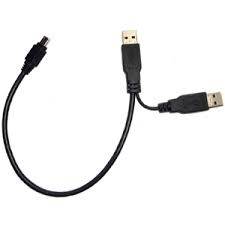
4. Buy 1x 1Tb portable HDD USB 3.0/2.0 - comes with a single cord USB - Micro USB 3.0 **Cable 1 **
5. Acquire normal USB cable (other end can be anything, micro, mini whatever.. as long as on end you can plug into a wall charger) ** Cable 2**

now for the fun bit...
6. Carefully strip USB 3 cable **Cable 1** exposing black and red wires - DO NOT CUT THEM
7. Cut the end of the normal USB **Cable 2** and peel back the covering until you see all foure wires (R,G,B +W)
8. Strip Red and Black wires (you can cut off the W+G they are for data only)
9. Twist Red and black from **cable 2** to **Cable 1**
10. Tape up wires with electrical tape, then tape up both cables.
11. you now have a Y Cable.

now plug it in
12. Plug the Micro USB 3.0 end into HDD, plug the one normal USB end into the iphone/ipad wall charger. Do this first to power up HDD or iPad wont recognise it. Then plug other normal USB end into the camera connection kit attached the iPad.
13. Open iFile
14. WOOHOO you have access to 1Tb of storage.


At the end of each day I copy my card contents on the iPad (using iFile) into a folder called gopro
I then plug in HDD
Copy (well cut and paste) contents from go pro folder to HDD.

So now I have a tiny HDD and one cable in my camera bag which provides all the storage I need. :D

EDIT: HDD must be formatted to FAT32 you can do this on your PC or Mac. (HFS works as well if you know what that is)


rambooc1
rambooc1
QLD
326 posts
QLD, 326 posts
23 Jul 2013 7:47pm
No need to make the USB split data/power cable, they are commonly available to buy ready made.

I also use DarthSups method above for file storage backup/ transfer to HDD using the iPad for GoPro and my other cameras. Awesome kit for travel light overseas etc.


Please Register, or first...
Topics Subscribe Reply