ka72 account linking with Garmin Connect

Monday
Reply
Register to post, see what you've read, and subscribe to topics.
Dylan72
Dylan72
QLD
716 posts
QLD, 716 posts
2 Nov 2026 11:20am
You can now link your ka72 account to a Garmin Connect account.

This will allow Garmin Connect to post your files direct to ka72 as soon as your session hits the cloud.

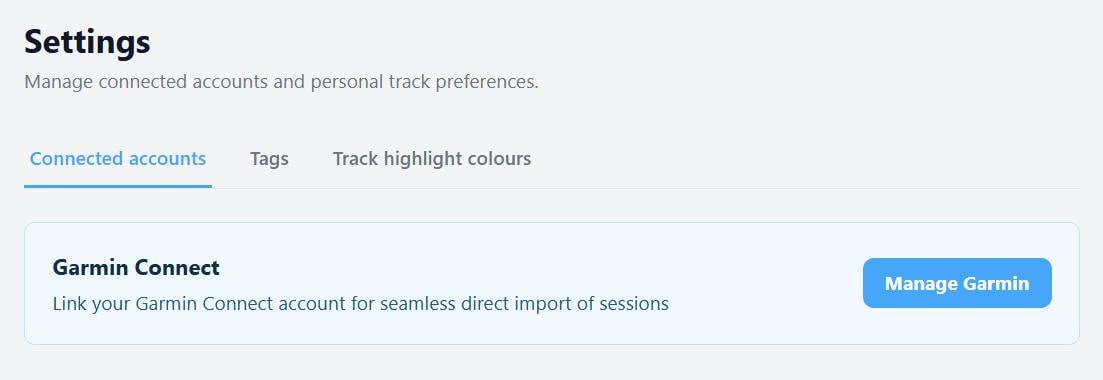
The linking is available to all registered users on the site (free and pro.) To set up your account link go to ka72.com/me/settings

Once it is set up, you can also use this page to limit the types of tracks that get posted to ka72.

How it works:
Sail with your watch as normal. When you are finished and save your session on the watch, after a while your device will typically pop up a message saying something like "Your activity is now ready to view"

Soon after this, open up ka72.com and you will see a banner at the top of the page advising you that your track has landed.

Open the link, check the track type and visibility, and hit post.

No more downloading/uploading. No more messing with zip files.

The integration is a work in progress. Please let me know if you hit any snags, or have any questions or suggestions for improvements.

OmarShamgar
OmarShamgar
NSW
120 posts
NSW, 120 posts
2 Nov 2026 12:53pm
That's clever and will save a lot of mucking around.

I can see the connected accounts button with nothing beneath it, nothing happens when I press the button in Chrome on Android.
decrepit
decrepit
WA
12929 posts
WA, 12929 posts
2 Nov 2026 12:13pm
Fantastic Dylan, you sure are doing some great work!!!!
Dylan72
Dylan72
QLD
716 posts
QLD, 716 posts
2 Nov 2026 2:58pm
OmarShamgar said..
That's clever and will save a lot of mucking around.

I can see the connected accounts button with nothing beneath it, nothing happens when I press the button in Chrome on Android.


Try refreshing the screen (ctrl-F5). You could have an old frontend cached.

This is what it should look like:


OmarShamgar
OmarShamgar
NSW
120 posts
NSW, 120 posts
2 Nov 2026 4:30pm
Must have been the case, I reloaded the page on Android and all was good.
SeanV
SeanV
QLD
7 posts
QLD, 7 posts
3 Nov 2026 6:55pm
Thanks very much Dylan, makes things so much easier
vosadrian
vosadrian
NSW
477 posts
NSW, 477 posts
4 Nov 2026 9:35am
Awesome work Dylan!

I have been using something similar with Strava (cycling/running/sailing) for some time and was hoping it would arrive to a work flow for windsurfing pushed to GPSTC. Sounds like it is basically there which is great!

Is there any intention to make the data arrive at GPSTC totally touch free at any time? Sounds like you have to login to KA72 and instruct it to post to GPSTC at the current time. Makes sense to have some way to avoid sessions being accidentaly incorrectly posted.

Also, quick question. I use the GPSTC datafield in the recommended way on a garmin 965 which I believe is for "Other" activity. I have just set up KA72 with that activity type to be imported. I don;t use "other" for anything else, so I presume that is correct for this common use case?
tbwonder
tbwonder
NSW
761 posts
NSW, 761 posts
4 Nov 2026 10:35am
Vosadrian,
There is no intention to have automatic posting to GPSTC. It is important that users review their tracks in KA72 before posting to GPSTC.
Yes if using my datafields in the recommended way then set the KA72 import to "Other". This is working for me.
mathew
mathew
QLD
2209 posts
QLD, 2209 posts
4 Nov 2026 1:01pm
tbwonder said..
Vosadrian,
There is no intention to have automatic posting to GPSTC. It is important that users review their tracks in KA72 before posting to GPSTC.
Yes if using my datafields in the recommended way then set the KA72 import to "Other". This is working for me.


Also possible to edit the track (once saved to the phone) to change the category from "other" to "windsurfing".
vosadrian
vosadrian
NSW
477 posts
NSW, 477 posts
4 Nov 2026 2:38pm
mathew said..


tbwonder said..
Vosadrian,
There is no intention to have automatic posting to GPSTC. It is important that users review their tracks in KA72 before posting to GPSTC.
Yes if using my datafields in the recommended way then set the KA72 import to "Other". This is working for me.


Also possible to edit the track (once saved to the phone) to change the category from "other" to "windsurfing".


Can you change the activity on the phone before the push from garmin connect to KA72 occurs? In my experience with Strava, garmin pushes it to Strava very quickly (within 30 seconds of when I sync a new activity from watch to phone). I suspect the push would happen before you could change the activity category.

I expected that step to review would be required in KA72 which makes sense. This still saves most of the steps I had to do in the past with using a PC to download the file and unzip and manually upload to KA72. Should be much easier now. Thanks for the efforts of all involved!
tbwonder
tbwonder
NSW
761 posts
NSW, 761 posts
4 Nov 2026 2:47pm
Yes, the 'Activity type' in Garmin is not related to the 'track type' in KA72.

My Datafields recommended set up uses the Garmin Activity type of 'Other' for Windsurfing, Windfoiling and winging. At this stage you need to manually set the KA72 track type.

Do not attempt to modify the Activity type in Garmin, you will lose some of the metadata related to the file
Please Register, or first...
Topics Subscribe Reply