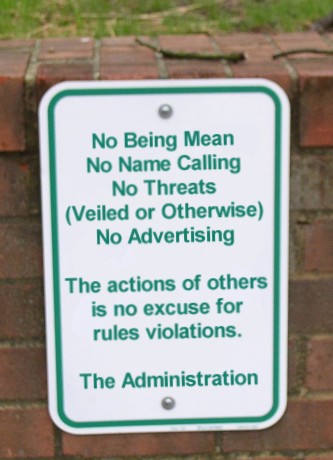
Hi!

You're here because you want/need help on something that is not right.


To help us help you the best, please do include context. 

e.g.

Rather than:
     "Tides not working"

Something like:
      "The high tide for Tantabiddi in WA seems to be late by 30 minutes"


Rather than:
      "Wave forecast missing"

Something like:
      "The wave forecast for Sydney is missing - the blue area not in the graph"     


All emails are answered by a real live food eating human, so don't be that "Didn't catch any fish, and now going to take it out on you" person.

Please, Seabreeze is a free to use service, so:
   * Be Kind  
   * Give Context
  * The more info you provide, the better we can help

Many Thanks - Laurie

Help & Support

In short

Recover access at /Forgot using your account email (or member name).

Use the recovery page — you do not need the old classic “login name only” forms.

How to do it
  1. Open /Forgot.
  2. Enter the email address on the account (or your member name if you still know it).
  3. Follow the email we send to reset access.

Tips:

  • Check spam/junk, and see bulk/spam folder help.
  • If you changed email and cannot access the old one either, use Feedback with any old usernames, approximate signup year, and locations you used — we may be able to help identify the account.
Related

forgot everything.

In short

Try /Forgot, then Feedback with enough details to verify the account.

When you no longer know the login name, password, and cannot use the old email, self-serve recovery may not be enough.

How to do it
  1. Still try /Forgot with any email address you might have used.
  2. Check spam for older Seabreeze mail (see bulk folder tips).
  3. Contact us via Feedback. Include: possible usernames, approximate join year, sports/locations you followed, and any order or classifieds details. Do not send passwords.

We can only restore access when we can reasonably verify the account is yours.

In short

See the main forgot login / email help article.

This topic is covered in the main recovery article.

Forgot my login name / my email!

Short version: go to /Forgot and use the email address on the account.

In short

Change your account email in Account Tools (/Member/Tools#email).

Update the email address on your account from Account Tools.

How to do it
  1. Sign in to Seabreeze.
  2. Open Account Tools.
  3. Open the Email section (or use #email on that page).
  4. Enter the new address and follow the confirmation steps (you may need to verify via a link we email you).

You can also use /Member/ChangeEmail.

If mail never arrives, see how to stop Seabreeze email going to spam/bulk and I didn't get my email.

In short

Rename your login in Account Tools (/Member/Tools#rename).

You can rename your login (display / member name) from Account Tools, subject to availability and site rules.

How to do it
  1. Sign in.
  2. Go to /Member/Tools.
  3. Open the Rename section (#rename).
  4. Enter the new name and save. If the name is taken or not allowed, the page will say so.

If Tools will not let you rename (restrictions, recent change, or a special case), contact us via Feedback and include your current login name.

In short

Change your password in Account Tools (/Member/Tools#password).

You can change your password from Account Tools.

How to do it
  1. Sign in to Seabreeze.
  2. Open the Members menu and choose Account Tools (or go to /Member/Tools).
  3. Open the Password section (or add #password to the URL).
  4. Enter your current password, then your new password twice, and save.
Troubleshooting

If you cannot sign in, use Forgot login / password instead.

Related

change email, change login name.

In short

Allowlist seabreeze.com.au and mark Not spam in Gmail, Outlook, Apple Mail, etc.

Mail apps and providers often file unfamiliar senders under Spam, Junk, Promotions, or Bulk. Help Seabreeze mail land in the inbox:

  • Gmail: Open a Seabreeze message → not spam. Add the From address to Contacts. Optionally create a filter: from seabreeze.com.au → Never send it to Spam.
  • Outlook.com / Microsoft 365: Not junk → add to Allowed senders / Safe senders.
  • Apple Mail / iCloud: Move out of Junk and choose “Never junk” / add the sender to contacts.
  • Yahoo and others: Mark as “Not spam” and add to contacts; check Bulk explicitly.

Also confirm the email on your account under Account Tools. Still missing mail? See I didn't get my email.

In short

Check spam, allowlist Seabreeze, retry /Forgot, then Feedback if needed.

Activation and password emails are sent automatically. If nothing arrives:

How to do it
  1. Wait a few minutes and refresh your inbox.
  2. Check Spam / Junk / Promotions / Bulk folders.
  3. Follow how to allow Seabreeze mail (add our addresses to contacts / allowlist).
  4. Confirm the email on the account is correct via Account Tools (if you can still sign in).
  5. Retry from /Forgot.

Still stuck? Feedback — tell us the address you expected the mail on (not your password).

In short

Open /Messages/Threads while signed in — PMs are not on the old profile pages.

Private messages are still on Seabreeze — they live under Messages, not the old classic profile pages.

How to do it
  1. Sign in.
  2. Open Messages (/Messages/Threads).
  3. Use the same member name the notification email mentioned. If you have more than one account, the message is on the account that was messaged.

From there you can read threads and compose a new message.

In short

You can add Seabreeze to your phone or tablet home screen so it opens instantly - no typing a URL, no hunting through browser tabs, just tap and go.

It takes about 10 seconds on either Android or iPhone, and the icon sits right on your home screen like any other app.

How to do it

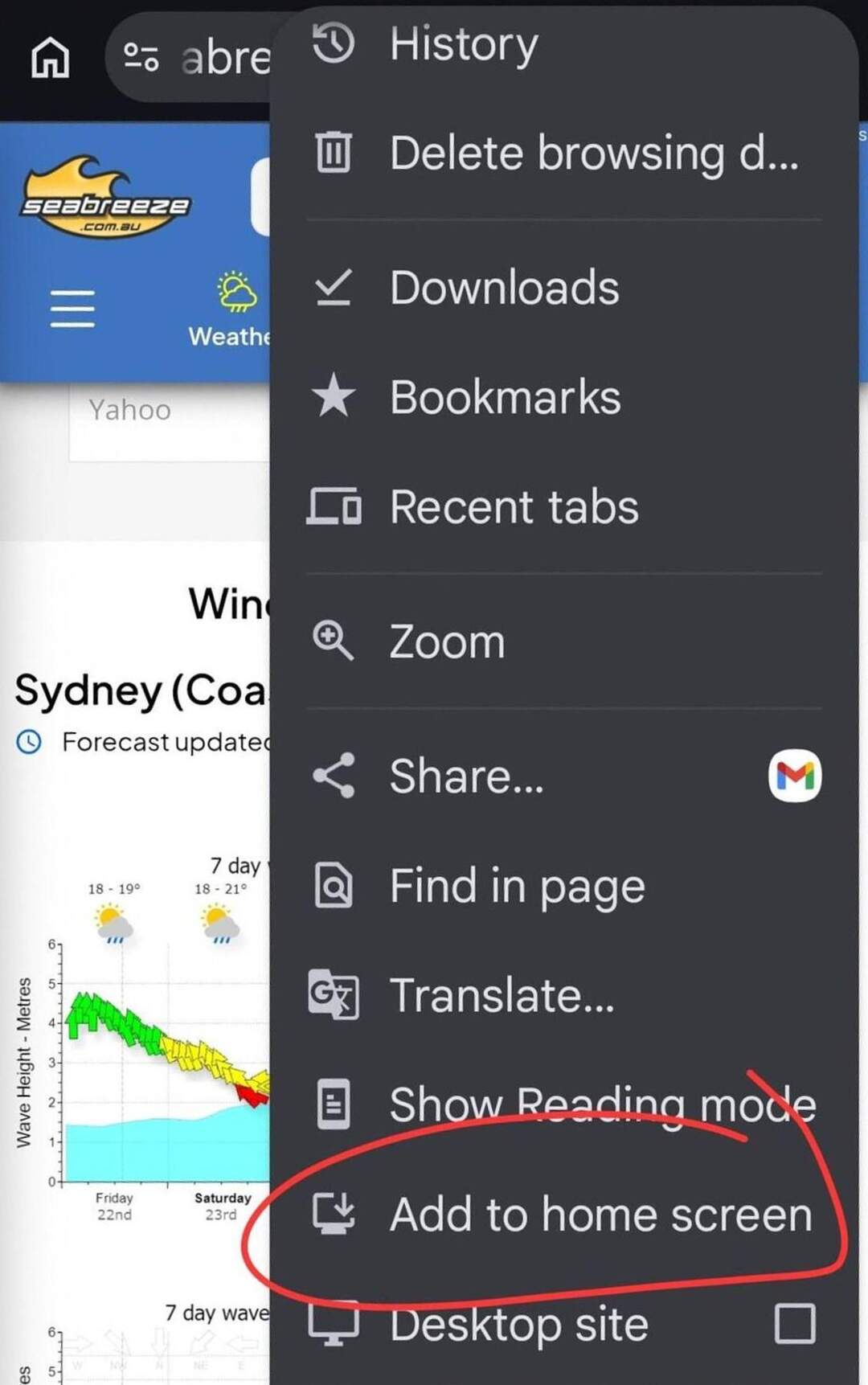
On Android: Chrome menu, then "Add to Home Screen". On iPhone: Safari Share button, then "Add to Home Screen".

Adding Seabreeze to your home screen is the fastest way to check the forecast before you head out - tap the icon and you're straight into wind, tides, and swell without opening a browser first.

It works on any Android phone or tablet using Chrome, and on any iPhone or iPad using Safari.

Android (Chrome)
  • Open Chrome and go to seabreeze.com.au
  • Tap the three-dot menu in the top-right corner
  • Tap "Add to Home Screen"
  • Edit the name if you like, then tap "Add"
  • The Seabreeze icon appears on your home screen

On some Android versions you'll be asked to drag the icon into position - just drop it wherever you want it.
iPhone and iPad (Safari)
  • Open Safari and go to seabreeze.com.au
  • Tap the Share icon (the box with an arrow pointing up) at the bottom of the screen
  • Scroll down and tap "Add to Home Screen"
  • Edit the name if you want, then tap "Add" in the top-right corner
  • The Seabreeze icon appears on your home screen

On iPhone and iPad, this only works from Safari - it won't show the option in Chrome or other browsers on iOS.

"Takes 10 seconds. Saves you 10 seconds every single time you want to check the forecast."
What you get

The icon looks and works like an app - tap it and Seabreeze opens full screen, straight to your last location.

No typing, no searching, no navigating through browser history.

Perfect for the quick check before you leave the house, or the tide lookup when you're already at the ramp and running on mobile data.

Set it up once at seabreeze.com.au and you're done.

In short

Why strong wind is green, how to reverse colours, and why arrows point where the wind goes.

Seabreeze wind arrows answer two questions at once: direction (where the wind is going) and strength band (colour).

Why is strong wind green?

On many charts red means danger. Early Seabreeze graphs used green for stronger wind so “good sailing breeze” stood out in a friendly way. That heritage remains the default for many views.

Reverse the colours

Prefer red-for-strong? Use ( /weather/ReverseGraphs ). Your choice is remembered in the browser (cookie). If it seems not to stick, allow cookies for seabreeze.com.au and avoid opening an old bookmark that forces the other mode.

Which way do arrows point?

Arrows point where the wind is going (downwind), not the compass direction the wind is coming from. That trips up a lot of first-time visitors — it is intentional.

Related older topics (now merged here): green-for-strong FAQ, reverse-colour stickiness, and “arrows point the wrong way”.

In short

Only the on-site recent history tools — no custom long-range history exports.

We do not offer custom multi-year wind history exports for arbitrary dates beyond what is already on the site.

On each location's weather pages you can use the history / recent observations tools that ship with that location (typically recent days of live wind, not decades of archive downloads).

For a specific research dump of raw values for a past calendar day, see raw wind data — that is generally not available as a personal export service.

In short

Raw personal exports are not available — use the on-site graphs and observations.

It would be great to offer one-off raw extracts for a chosen date, but we do not provide personal raw wind data exports.

Please use the graphs and observation views already published for each location. Bulk or historical research access is not a supported helpdesk service.

In short

Embed widgets from /weather/shared.

Yes — we publish embeddable weather widgets.

See the current options at /weather/shared (the old /widget.asp address redirects here).

Follow the instructions on that page for panel types, location, and styling. Please do not scrape or hotlink unpublished internals.

In short

Tap the star on any wind graph, then open My Weather to see your custom layout. It works in this browser without logging in; log in if you want the same favourites on another device.

Most of the time the standard weather layouts are enough. When you want your own mix of graphs - for example Perth metro next to south-west forecasts - use favourites.

Add graphs
  1. Open a Wind Forecast (or other graph) page.
  2. Select the star icon at the top right of a graph to add it.
  3. When it is a favourite, the star fills in:
  4. Repeat on other graphs or locations until you have the set you want.
View and arrange
  1. Open My Weather (Weather / My Favourites).
  2. Your selected graphs appear there.
  3. Remove a graph by turning its star off.
  4. Reorder with the move controls:
Troubleshooting

If the layout does not remember your choices, allow cookies for this site. Favourites are stored in the browser (and with your account when you are logged in).

In short

The Synoptic Chart is the big picture view of pressure across the country, the highs, lows and fronts that actually create the wind you see forecast for your beach. Reading it gives you a sense of why the forecast says what it says, and what's likely coming after it.

The wind graph tells you what's expected at your location. The synoptic chart tells you why, by showing the whole weather system responsible. Once you can read one, forecasts start to make a lot more sense, and you get an intuitive feel for what's coming a few days out.

Highs, lows and isobars

An H marks a high pressure system, generally calmer and clearer. An L marks a low, usually unsettled and windier. The lines circling each system are isobars, and wind flows roughly along them, clockwise around a high and anticlockwise around a low in the southern hemisphere. Where the lines are drawn close together, expect stronger wind; where they're spread wide apart, expect it to be light.

Fronts

A line marked with triangles or half circles is a front, the boundary between two different air masses. Fronts are usually where weather changes fastest, a wind shift, a burst of rain, or a temperature drop. Watching where a front sits relative to your coastline is a good way to judge how soon a change will actually arrive.

Related reading

For a fuller explainer with more examples, see How to Read a Synoptic Weather Chart . See also How does the weather work?

In short

The Rain Radar shows live Bureau of Meteorology rainfall over your area, with a short timeline you can play back and forward. Use it to see whether rain is actually heading your way, from how far off, and how fast it's moving.

A forecast tells you the chance of rain today. The radar tells you where the rain actually is, right now, and which way it's drifting. That difference matters when you're deciding whether to launch, paddle out, or just wait twenty minutes for a passing shower to clear.

Reading the colours

Colour is intensity. Light blue or green is drizzle and light rain, yellow and orange is heavier rain, and red through to purple is intense, often thundery rain. A blob doesn't tell you much on its own; watch it for a couple of frames and you'll see whether it's building, weakening, or simply sliding past.

The timeline

The bar along the bottom is the important part. It plays back the last few hours of radar so you can watch a system's actual track and speed, rather than guessing from a single frame. Drag it yourself to step through history, or let it run and watch the pattern repeat.

Easy to miss
  • The layers icon on the timeline toggles how solid the radar looks against the map underneath, which is handy for checking whether rain is sitting over water, over land, or right on your stretch of coast.
  • Range presets sit above the map: 50, 100, 200 and 500 km, plus custom distances out to 4000 km for a whole-continent view of an approaching front.
  • A pin icon lets you save favourite spots so you can flick between the places you actually care about instead of re-searching each time.
  • National and state mosaic links near the bottom jump you out to the bigger picture when a local view isn't enough.
Good to know

The wider views are a mosaic of several separate Bureau radars stitched together, so on rare occasions you might notice a faint seam where two stations' coverage meets. That's a stitching artefact, not missing rain.

Related reading

For a deeper dive into radar colours and storm cells generally, see How to Read Australian Weather Radar . If you've ever wondered why the radar shows rain when the sky looks clear, see Why does the Rain Radar show rain when it isn't actually raining?

In short

Wind Alerts text you the moment live conditions at a chosen station cross a threshold you set. Forecast Alerts send a scheduled daily text summarising the outlook. Both need you to be signed in and carry a small amount of prepaid SMS credit.

Not everyone wants to open an app first thing to decide whether the day is worth it. A Wind Alert fires the instant your chosen station crosses the direction and speed you set, so you find out the moment it's actually on. A Forecast Alert instead sends a daily text summarising what's coming, so you know the outlook before you're even properly awake.

Setting one up

From the Alerts page, adding a Wind Alert lets you choose the station, direction and minimum speed that should trigger a text. Adding a Forecast Alert lets you choose a location and the time of day the daily summary should arrive. Either can be edited or removed at any time from the same page.

Credit and mobile numbers

Each text uses a small amount of prepaid credit, topped up from the same page. A member can register their own mobile plus additional numbers underneath it, which suits a family or a crew who all want the same alert without everyone setting one up individually.

Related reading

See Why didn't I get my SMS weather alert?

In short

Surf and beach cameras let you see actual conditions before you commit, swell size, wind texture on the water, how crowded it is, the sort of detail a numeric forecast can't fully capture.

A forecast graph gives you the average expectation. A camera gives you the truth on the day: whether it's glassy or wind-blown, whether the swell has actually filled in yet, and the difference between sets and lulls that no single wave-height number shows. Checking the cam before a long drive can save the drive entirely, or confirm it's worth every minute.

What you're looking at

Cameras come from a mix of sources, some run directly by Seabreeze, others shared by local councils or state transport departments, and most refresh periodically rather than streaming true video. A timestamp burned into the corner of the image tells you exactly how fresh the view is, worth a glance before you read too much into a single still frame.

Live Swell Graphs and Panorama

The Live Swell Graphs tab pairs the camera vision with numbers from a nearby wave buoy where one exists, useful for putting an actual figure on what you're seeing. Some locations also offer a panorama camera you can pan around, handy for checking wind direction and texture across a whole bay, or comparing several breaks from a single view.

Related reading

See What is the Marine (Coastal Waters) Forecast?

In short

Models + coastal focus — not golf clubs (sadly).

Years ago someone asked if we stood on the beach with golf clubs. We wish.

In practice: numerical weather models, coastal focus, and a lot of care about how wind is presented for watersports. Humour aside, treat it as guidance and look out the window too.

See also how the weather works.

In short

Wind, pressure, seabreeze timing — and how to use Seabreeze graphs with that in mind.

Wind Glorious Wind… If your sport runs on breeze (or you are hiding from it), it pays to know what the graphs are trying to say.

Wind is air moving from higher toward lower pressure. Heating, cooling, and the land/sea contrast bend that flow — the classic afternoon seabreeze is cool marine air drawn inland when the land bakes.

Reading forecasts: look for timing (when it fills in), direction (onshore/cross/offshore for your beach), and whether gusts will turn a “nice 15” into a messy 22. Models smooth reality; cliffs, rivers, and lagoons punch holes in that smoothness.

On Seabreeze: use the wind graphs as the primary tool, compare nearby locations, and treat single-hour miracles with suspicion. Humour stays welcome; physics still wins.

Deep dives: how to read the wind graphs, Beaufort, when forecasts miss, arrows & colours.

In short

Authoritative tide sources + leave margin for weather effects.

Pretty darn good. Tide predictions are sourced from authoritative tide data for the tide stations we publish.

Always leave margin for weather setup (surge, barometric effects) and local quirks — tide books and common sense still win for bar crossings.

In short

Time across, speed up the axis, arrows show where wind goes; use gusts and neighbours.

Wind graphs are the heart of Seabreeze weather. Here is how to read them on the current site.

What you are looking at
  • Time runs left → right (local time for the location, including daylight saving).
  • Wind speed is the height of the plot (knots or the units shown on the axis).
  • Arrows / barbs show direction — they point where the wind is going. Colour bands encode strength; see arrow colours and direction.
  • Gusts (when shown) sit above the sustained wind — useful for how messy a session will feel.
How to use them
  1. Pick your location (or My Weather favourites).
  2. Scan the next 1–3 days for the window that matches your sport (sea breeze timing matters as much as peak knots).
  3. Cross-check a neighbouring station if your launch is sheltered or cliff-affected — meters measure their site.
  4. Translate knots with Beaufort if you think in “fresh / strong” language.
Forecast vs live

Forecast graphs are model guidance. Live traces are observations. When they disagree near the coast, local effects often win for a few hours — see why forecasts feel wrong.

Related

how wind / seabreeze weather works, saving graph images.

In short

See How does the weather work? and How to read the Wind graphs.

This essay is merged into the weather-work guide.

How does the weather work?

Also: How to read the Wind graphs.

In short

Screenshot or save the on-page graph — bitmap mode is gone.

Graphs are drawn in the browser (not a separate “bitmap mode” download).

To keep an image:

  • Screenshot the graph area (OS screenshot tools, or your browser’s capture).
  • Or use your browser’s context menu on the graph canvas / image if it offers “Save image” / “Copy image”.

There is no supported /weather/settings/bitmap toggle anymore (that link only sent people to location search).

Related

reading wind graphs.

In short

Yes — weather times use local time, including daylight saving.

Yes. Times and dates on Seabreeze weather pages use local time for the location, including any current daylight saving adjustment for that state/territory.

When a region starts or ends daylight saving, graph and forecast labels move with local civil time — you do not need to add or subtract an hour yourself.

In short

The moon phase and its rise and set times matter more than most people expect near the coast. They drive how big your tides swing, and they decide how much natural light you'll have for an early start or a late finish.

Sailors and anglers watch the moon for a reason that has nothing to do with romance. Around new moon and full moon, the sun and moon line up and pull together, producing spring tides, the biggest swing between high and low. Around the half-moon points, they're pulling at angles to each other, producing neap tides, the smallest swing. Glancing at the moon phase is a quick way to guess how strong the tidal push and pull will be, without opening the tide chart at all.

Reading the calendar

Each day's tile shows the phase itself, illustrated, with rise and set times underneath. The illumination percentage tells you exactly how full the moon is that night, useful for judging how much natural light you'll actually have if you're planning a dawn or dusk session.

Why rise and set swap order

Moonrise doesn't always happen before moonset in the list, and that's not an error. Around full moon, the moon rises close to sunset; around new moon, it rises close to sunrise. Which one lands first in the day genuinely changes through the month. A small reverse-order toggle near the Sun and Moon times lets you flip the display if you find the other order easier to follow.

Related reading

See How good are the tide forecasts?

In short

Almost always this is either ground clutter near the radar station itself, or rain that's falling from a higher altitude and evaporating before it reaches the ground. It isn't a fault with the page.

Radar doesn't measure rain on the ground. It measures moisture reflecting off a beam that travels in a straight line while the earth curves gently away beneath it, so the further you are from the station, the higher above the ground that beam is actually sampling.

Two common causes

Close to a radar station, solid objects such as hills, buildings, wind turbines, or even birds and insects can scatter the beam back and show up as a patch of light green that never quite matches real weather. Further out, the beam can be sampling rain that's still high in the cloud and evaporates before it hits the ground, a phenomenon meteorologists call virga.

How to tell the difference

Real rain moves. Play a few frames on the timeline and a genuine system tracks steadily in the direction of the wind, building or fading gradually. Clutter tends to sit in exactly the same spot, frame after frame, usually right around the radar site marked on the map, regardless of what the wind is doing.

Related reading

See How do I use the Rain Radar? for the full picture, including the timeline and range controls.

In short

See Arrow colours and wind direction.

This topic is now part of the combined guide.

Arrow colours and wind direction

In short

See Arrow colours and wind direction.

This topic is now part of the combined guide.

Arrow colours and wind direction

In short

Retired IE/bitmap performance article — use a modern browser and refresh.

This article targeted Internet Explorer and the old bitmap/HD graph toggles. Those browsers and settings are gone.

If graphs feel slow today, try a current browser (Chrome, Firefox, Safari, Edge), disable heavy extensions, and do a normal refresh. There is no bitmap “quick fix” link anymore.

Related

forecast images not updating, saving graph images.

In short

See What is the Beaufort Scale?

Use the canonical Beaufort article (same scale, kept up to date there).

What is the Beaufort Scale?

In short

Hard refresh / another browser; check if all locations are stuck.

Browsers cache images and scripts aggressively.

  • Do a normal refresh, then a hard refresh (shift-reload) on the weather page.
  • Try a private window or another browser to rule out extensions.
  • Check whether neighbouring locations update — if everything is stuck, it may be a wider outage (try again shortly).
Related

saving graphs.

In short

Every location's Tides page shows the next few highs and lows right now. The Tide Calendar zooms out to a full month at a glance, which is much easier for planning a trip weeks ahead than paging through single days.

If you only need today's tide, the Tides page is quicker. But if you're planning around a low-tide reef walk, a boat launch, or a fishing trip a few weeks out, the calendar lays the whole month out at once so you can spot the best days without clicking through one at a time.

Reading a day cell

Each cell holds a small tide curve for that day, plus the time and height of every high (marked H) and low (marked L). Heights are measured against a fixed chart datum for that location, so they're best compared day to day rather than expected to line up with round numbers.

Handy but easy to miss
  • Switch between a full Month view and a rolling 30 Days view, whichever suits how you're planning.
  • The "Print / save as PDF" button genuinely earns its place here, a printed calendar taped inside a tackle box or boat hatch is still hard to beat.
  • A "Nearby" shortcut is worth knowing about: most tide times are calculated from the closest official reference port, so if your exact spot isn't a primary station, nearby is where to look for the closest match.
Related reading

See How good are the tide forecasts?

In short

Every warning shown on Seabreeze comes straight from the Bureau of Meteorology. We mirror the live feed next to your forecast so you see it without needing a separate visit to a government site, but the Bureau decides what's issued, not us.

Severe weather, marine, flood, and other official warnings are issued by the Bureau for a reason: something in the area genuinely needs attention. Always treat the Bureau's own advice as the authority, and use Seabreeze's warnings page as a convenient window onto it rather than a replacement for it.

Reading the map

The coloured outline traced on the map is the actual warned area, drawn from the Bureau's own boundary data, so it's worth zooming in if your exact spot sits near the edge. Choosing a state along the top narrows the list to that state; opening any individual warning shows its full text alongside a map zoomed to the affected area.

Where else you'll see them

A compact warnings card also appears on the Rain Radar, Marine Forecast, and other location pages, so a live warning surfaces right where you're already checking conditions rather than only on a dedicated page you'd have to think to visit.

Related reading

See How do I use the Rain Radar? and What is the Marine (Coastal Waters) Forecast?

In short

Nearby Observation Stations lists every live weather station within range of a location, so you can see what wind and temperature are actually doing at the beach, hill or island next door, not just at your one primary spot.

Wind along the coast is very local. A headland, a hill, or even a line of buildings can add or strip away several knots compared with a station only a few kilometres away. A single number for "your" location is a useful starting point, but a spread of nearby readings shows the real pattern moving through, which is far more useful when you're deciding whether it's worth the drive.

What's on the table

Live temperature and apparent temperature, rain since 9am, wind speed and gust with a direction arrow, humidity, pressure, and, where the station has the right sensors, delta-T and dew point. Delta-T is handy for judging fire-weather style dryness and thermal potential; a blank column simply means that particular station isn't fitted with that sensor.

The compass alongside

The small panel next to the table shows your reference location's own live wind as a compass rose, drawing on the same feed as the table so the two stay in sync as new readings come in.

Related reading

See Where are the wind readings for XYZ taken from? and Why are the wind readings wrong?

In short

One Settings panel controls every unit Seabreeze displays (wind, wave, tide, temperature and rain), the site's appearance, and which colour means "strong wind" on every arrow across the whole site.

Weather Settings sits in the same place as Favourites and Help on every weather page's side menu, so it's always one step away no matter which forecast you're looking at. Changing anything here updates every graph, table and forecast across the site immediately, there's no need to set it more than once.

Units, in what you actually think in

Wind speed offers knots (the sailing and aviation standard), km/h (what the news uses), m/s (favoured by some technical and model users), and "Km/h + Knots", the classic Seabreeze dual display showing both together. Wave and tide height switch between feet, still how a lot of surfers talk swell size, and metres, the official Bureau unit. Temperature switches between Celsius and Fahrenheit, and rain between millimetres and inches.

Appearance

Choose Light, Dark, or System default, which follows your device's own setting automatically and switches with it. Subscribers unlock a handful of extra colour palettes, Ocean, Mist, Slate, Graphite, Spice, Sage and Plum, if you'd like the site to look like more than just light or dark.

Wind Arrow Colours

This is the one setting worth actually understanding rather than guessing at: choose whether red or green marks the strongest wind on every arrow, graph and station table site-wide. There's real history behind why Seabreeze offers both conventions side by side, covered in full in Arrow colours and wind direction .

Related reading

See How do "My Graphs" / My Weather layouts work?

In short

See Swell, Waves & Seas — wave height is significant wave height for that sea state.

This is explained in the swell / waves / seas article.

What's the difference between Swell, Waves & Seas?

Short version: forecast wave height is the significant wave height for the sea state being described (not every individual ripple), and swell vs wind-sea are called out separately when the product provides them.

In short

Beaufort force table in km/h and knots, with land and sea descriptions.

The Beaufort scale is a way of describing wind strength by what it does on land and at sea — useful when a knot number alone does not paint the picture.

ForceTermkm/hknotsOn landAt sea
0Calm00Smoke rises verticallySea like a mirror
1–3Light winds≤19≤10Wind on face; leaves rustleSmall wavelets, glassy
4Moderate20–2911–16Dust/paper lifts; small branches moveSmall waves; frequent white horses
5Fresh30–3917–21Small trees swayModerate waves; many white horses
6Strong40–5022–27Large branches move; wires whistleLarger waves; more foam/spray
7Near gale51–6228–33Whole trees move; hard to walk into windSea heaps up; foam streaks
8Gale63–7534–40Twigs break; progress impededModerately high waves; spindrift
9Strong gale76–8741–47Slight structural damageHigh waves; dense foam streaks
10Storm88–10248–55Trees uprooted; considerable damageVery high waves; sea turns white
11Violent storm103–11756–63Very rarely inland — widespread damageExceptionally high waves; long foam patches
12+Hurricane≥118≥64Air full of foam/spray; visibility wrecked
Related

how to read wind graphs, arrow colours.

In short

See Swell, Waves & Seas.

Covered in the fuller glossary article.

What's the difference between Swell, Waves & Seas?

In short

The Marine Forecast is the Bureau of Meteorology's official worded Coastal Waters forecast, the same product used for boating and shipping safety, covering weather, wind, seas and swell for the wider zone off your coast.

It reads differently to the graphs you're used to, and that's by design. The wind and wave graphs are Seabreeze's own model-driven forecast, tuned for watersports and shown as a visual timeline for a specific spot. The Marine Forecast is the Bureau's plain-English forecast for the whole coastal zone, written with a wider safety margin because it has to cover everyone from a tinny to a tanker.

Seas versus swell

"Seas" describes the local, wind-driven chop right now. "Swell" describes longer, more organised waves that have travelled in from a weather system somewhere else, sometimes a very long way away. A forecast of small seas with a solid swell running is common, and means the wind might feel gentle while there's still real size in the water.

Phrases worth knowing

Wording like "becoming" or "increasing" describes how conditions change through the period, not a single fixed number, so read the whole sentence rather than just the first figure. It's written for planning a day on the water, not for picking the exact hour to launch.

Related reading

See What's the difference between Swell, Waves and Seas? and What are the Weather Warnings, and where do they come from?

In short

Seas = local chop; swell = travelled longer-period energy; wave height ≈ significant height.

Seas are the short, local chop created when wind blows on the water nearby. Given enough time and fetch, that energy organises into longer swell.

Swell is the longer-period wave energy that has travelled away from where it was generated — the “rock in a pond” rings that keep going after the wind at your beach has changed.

Waves (in surf talk) are usually what you want to ride: organised swell that stands up on the reef or sandbank. Forecast “wave height” is typically significant wave height for that sea state — not every tiny ripple, and not always the single biggest set of the day.

Examples
  • 6 ft swell, no wind, no seas: glassy cylinders — surfers grin.
  • 6 ft swell, no wind, moderate seas: same swell energy, but chop on top ruins the face.

Seas can sit on top of swell and spoil a session even when the swell height looks perfect on paper.

In short

See Arrow colours and wind direction.

This topic is now part of the combined guide.

Arrow colours and wind direction

In short

Each location maps to a specific station/feed — see the live wind labelling.

Each live wind location is tied to a specific observation source (a named station or feed). On the location’s weather pages, look for station labelling / about info on the live wind panel.

Readings are not claimed to be mid-bay at mast height for every sport. If two nearby locations disagree, both can be “right” for their sites.

Related

why readings look wrong.

In short

Sea temperatures are under Weather at /weather/sea-temperature/… (pick your state slug). Classic seatemp.asp links are gone.

Sea temperature pages live under Weather:

/weather/sea-temperature/western-australia (and the same pattern for other states, e.g. new-south-wales, queensland).

You can also reach sea temperature from the Weather menus when the product is enabled. If the page says it is temporarily unavailable, that is a site-wide switch — try again later or use Feedback.

The old *_seatemp.asp graph links are retired.

In short

See also: why forecasts can be wrong.

When they nail it, enjoy it.

For the flip side (and a straighter explanation), see Why are the forecasts so wrong?.

In short

Forecasts can miss — coastal wind is hard; compare models and neighbours.

Sometimes they will be — weather is chaotic, and coastal wind is especially fiddly.

  • Models disagree; we blend and present what is useful for wind sports, which will not always match another site or a TV bulletin.
  • Local effects (cliffs, river mouths, sea breeze timing) can beat a grid forecast for a few hours.
  • Compare several days and neighbouring locations before writing a day off.

Also see different to the BoM, different to other sites, and how the weather / seabreeze works.

In short

Meters report their site, not your exact launch — learn local bias.

Live meters measure where they are mounted — not always the exact corner of the bay you sail. Height above ground, sheltering, and distance from the water all bias a reading.

Use meters as a regional truth serum, compare a few nearby stations, and learn your spot’s usual offset versus the graph.

Related

where readings are taken.

In short

Almost always it's one of three things: the SMS credit balance ran out, the alert's trigger genuinely wasn't met, or the mobile number on file is out of date.

Alerts fail silently by design rather than emailing an error, which is convenient right up until the one time you were relying on it. These three checks cover nearly every case.

Check these first

Each text costs a small amount of prepaid credit, and once the balance hits zero, alerts simply stop sending rather than showing any warning, so a quick look at the balance on the Alerts page is always worth doing first. It's also worth confirming the alert itself is still turned on rather than accidentally removed, and that the mobile number saved on the page is current and able to receive texts, a stale number after a phone change is one of the most common causes.

For Wind Alerts specifically

A Wind Alert only fires when the live reading at your chosen station actually crosses the exact threshold you set. If the wind sat just under it, or your launch spot simply reads differently to the nearest station, no text is the expected outcome rather than a fault. Nearby Observation Stations is a good way to see the wider pattern and judge whether your threshold or station choice needs adjusting.

Still stuck

Contact Feedback and mention the alert type and roughly when you expected it, and it can be checked from our end.

Related reading

See How do SMS Wind and Forecast Alerts work? and What can Nearby Observation Stations tell me?

In short

See Arrow colours and wind direction.

This topic is now part of the combined guide.

Arrow colours and wind direction

In short

See Arrow colours and wind direction.

This topic is now part of the combined guide.

Arrow colours and wind direction

In short

Different models and presentation — disagreement is normal.

Different sites ingest different models, update on different schedules, and draw maps with different smoothing. Two honest forecasts can disagree by several knots or an hour of sea-breeze timing.

Use more than one source when the session matters, and learn how your local spots usually bias versus the chart.

In short

BoM and Seabreeze serve different products — differences are normal.

They can be — and that is often expected.

The Bureau publishes official public forecasts. Seabreeze emphasises wind and coastal conditions for watersports, using model guidance and presentation choices aimed at that audience. Different products, different emphasis; neither is “the only truth” for every beach hour.

More context: why forecasts feel wrong, vs other sites.

In short

Retired 2012 layout announcement.

This 2012 “new layout / Windows 8” announcement is historical only and no longer applies.

For current site help, start from the Help index (Membership, Weather, Forums, Classifieds, Gallery).

In short

Request closure via Feedback / account tools; old public posts may remain.

Want out? Fair enough.

Use account tools where available, or Feedback to request account closure. Understand that public posts you already made may remain as part of thread history unless there is a legal/privacy reason to scrub them.

In short

Context matters; Feedback if you think a removal was wrong.

It's true. Context, history, and whether something is actually breaking the rules all matter. “They got away with it” is not a free pass.

If you think a removal was wrong, Feedback calmly with links. Read Forum Rules.

In short

Report rule-breaking posts; use thumbs/replies for ordinary disagreement.

We may well be too.

If it should be deleted, use the report control on the post (flag / report). That queues it for moderation — faster than a forum pile-on.

Disagreeing with an opinion is not the same as “disgusting”; use thumbs and replies for ordinary disagreement, and report for genuine rule-breaking.

See also Forum Rules and report flag.

In short

The humorous, educational Seabreeze forum rules — spirit of the site, reporting, and how not to be that member.

The Seabreeze Forums Crash Course

Why does this place even exist?

Everyword here follows on from why the forums are here - the spirit and intent of the site.

These forums are here to create a meeting place for people who care about our sports. We want to improve, we want to know how to fix gear, how to use the gear, the best conditions, where those conditions are, what gear works best where .. and of course, we all want to meet people with similar interests.

In this environment, people are friendly and helpful to each other. We all stand on each others shoulders to reach higher, achieve more and have more fun.

Our sport is our recreation. It's what we do for fun - it's not about getting all serious and upset, there's enough of that in the stuff we do for money.

For years, the forums have been, and continue to be a success - friendships have been made, meetings on the beach organised, events attended, accomodation offered to travelling members, beaches saved through petitions, territorial disputes settled pages of shared knowledge created, and so much more.

It aint' always blue sky...

Occasionally, a post or topic with inappropriate content will appear. It may stay online longer than it should while we get to it. Whilst this is happening we appreciate your patience. We appreciate you taking the time to let us know via the voting mechanisms explained later.

Please understand that our moderators are not pyschic or even online 24 hours per day, 7 days a week, so there will always be the possibility that inappropriate content will be viewable longer that we would all hope.

There will be members who are different and post questionable content. Why?

Maybe they are drunk, tired and/or emotional?
Maybe they're stressed and are not being themselves?
Maybe they feel anonymous and believe they won't be caught out?
Perhaps they're blunt, direct or simply rub you up the wrong way?
Perhaps they're injured and frustrated?
Perhaps there is an issue that's 'emotionally loaded' for them?
They might enjoy stirring others up?
...or it could just be the way they are all the time!

It's for these situations that rules are needed.
It's for these situations that moderators are needed.

Unfortunate ... but to be expected .. it's part of the territory.

Tips to handle posts that upset you.

Beware of seeing what you want to see. A common mistake people make is to read a post with the emotion they are currently feeling, not the emotion of the writer.

Seek to understand before seeking to be understood.

Could there be a slightest weeniest smallest possibility that you may have made an error? Unbelievable as it may sound, some of us do make mistakes!

Basic Rule: Have the courage to step away. Go do something different before getting all fired up on the keyboard.

The Seabreeze Forums Rules
No game will work without rules. By creating a login on Seabreeze, you hereby agree to abide by these rules. Breaching these rules can result in post or topic deletion and continued breaches can result in your login being either temporarily suspended or permanently banned.

The Rules Summary

* Be friendly
* Be helpful
* Show respect for others
* Be part of the community
* Help others be better
* Help keep topics, on topic
* No abuse, insults or personal attacks
* No foul language
* No trolling
* No inappropriate or illegal material
* No "For Sale" or "Wanted to Buy"
* No business advertising
* No cross posting
* No forum spamming
* No hijacking topics or trolling
* No religious or political debates
* No defamatory comments
* No duplicate logins
* No surveys
* No complaints about moderation (email us instead)

General Netiquette

* Avoid Sarcasm and dry humour. It does not work with the written word. Putting a smiley after a nasty piece of text doesn't fix it.

* Disagree? - discuss the subject, not the person. If you goal is to win them over to your point of view, provide evidence why your point of view is worthwhile adopting. Be constructive and forward moving.

* Make topic titles interesting - they make or break whether your post gets read.

* A large audience will see your post, and your words may come back to haunt you. This audience may potentially include past, present and future employers, staff at your place of study, friends, family, etc. And unlike the spoken word, your written posts will exist here for a long time.

* If you are responding to someone else's comments, try to include a quote or summary of their post, to provide context to other readers. Quoting more than 10 lines is a bit much.

* If you want to take a topic offline and write a personal response, please use the "Private Message" facility - an Email button is available on each post, or by clicking on the members name.

* Do not start or perpetuate flame wars. If someone insults or attacks you, do not respond in kind - because "they started it" is an incredibly lame argument

* DON'T USE OTHERS BEHAVIOUR AS AN EXCUSE FOR YOUR BEHAVIOUR. If we had a dollar for each person who wrote in " how come I can't do it when so and so is doing it? " There are plenty of reasons, the point is, just because you see someone else breaking the rules does not give you the right to break them and use others actions as your justification.

Unacceptable Content


Racism, Sexism, Ageism and Religious Intolerance and Vilification

Seabreeze is open to people from any race, gender, physical or mental condition, sexual preference/orientation, IQ, age or religion, and as such intolerance or vilification of other people's beliefs, culture, IQ, gender, physical or mental conditions, sexual preference/orientation or age is unacceptable.


Foul Language (Swearing)

Seabreeze is a web site open to all ages, and we aim to have it stay that way. As such, the use of foul language is considered to be unacceptable.

For the sake of the younger visitors to our site, please refrain from swearing.
In order to prevent casual swearing, Seabreeze filters the most inappropriate swear words.


Smarty Pants Swearing

Please also note that swearing which is contextually understandable, e.g. removing a letter, replacing letters with @,* or other characters, or changing the spelling slightly, will also be moderated.


Moderation of Foul Language

The following points outline the basic moderation policy regarding foul language on Seabreeze, and applies to posts, usernames, quips, and any other content on Seabreeze:

* Content containing "heavy weight" swear words, specifically the F & C words, are completely inappropriate on Seabreeze. All content containing such words - hidden or not - will be removed.

* Content containing lesser swear words will not normally be moderated, provided the words are used sparingly (e.g. once in a post), and the content is otherwise on topic and useful. Use of such words in reoccurring content (usernames etc) is always inappropriate.

* Content with swear words that are used in the context of a personal attack/insult will be removed, not necessarily because of the foul language, but for being a personal attack. This also goes for all those non-swear words insults like "fool", "idiot", etc.

Inappropriate Content

Inappropriate Content is considered to be any topic that would be unacceptable in a talk to a Year 8 class. This includes (but is not limited to) any of the following:

- Sex and sexual acts;
- Violence and acts of cruelty to other humans or animals;
- Pictures of gore, violence, pornography or innappropriate nudity;
- Illegal behaviour;


Private Conversations

The posting of private correspondence (PM's, emails, etc) or transcripts of private conversations (phone calls, face-to-face discussions) are not permitted, for two reasons:

1. There is no way to verify the validity of the text; and
2. There may be copyright implications arising from the publication of such private communication, in a public forum, without permission of both parties.

Public announcements (such as ISP mass mail outs, etc) are considered already in public view, and are thus considered fair game for re-posting. In cases where such an announcement is made on a website, posting the URL is preferred to posting the complete text.


Offensive Websites

Seabreeze is open to people of all races, religion and ages, so links to websites containing offensive or unacceptable material, such as foul language, inappropriate images (images of a violent or pornographic nature), racial vilification (hate sites), warez links, conspiracies, etc., are completely unacceptable and will have the post removed, and the login suspended.

Complaints about a business/associations

When this occurs, the poster is usually quite fired up and emotional. Often the customer is now out to cause as much damage as possible to the business with the mission that they are "fully justified" (their words) and "simply stating facts" (their words) about the business/association.

This may be the case .. or not. There are many sides to any story. The point is that the Seabreeze forums are not the appropriate place to resolve the issue. Go to the appropriate legal/government authority and do it there.

Choose not to, and end up in hot water. As soon as you flame a business, you'll usually get supporters of the business come out in defence and question your behaviour and motives. People interested in the discussion will seek more information from you. It soon descends into an argument containing many and varied versions of the truth and everybody goes home unhappy.

It has never ended well for anybody.

The business is damaged, the poster now has a stigma in the forum community (and now can't deal with many shops because the shops know what will happen if they cross this customer - their business will get dragged through the mud.)

And of course, there's also the situation when the poster does not really have a complaint, but is simply a competitor or naive associate of a business who thinks the way to get more business is to degrade the competition.

A special note: This applies (and has been applied) to any business, not just businesses that sponsor the site.

Overseas Purchasing / Why are we so ripped off / Buying Deals

In this case the poster has discovered he can buy an item overseas cheaper than in a shop here in Australia. Now they want to share this with everybody, and also want to infer that because the price is different that "Australian businesses are ripping us all off".

Posts of this nature will be locked/or removed as they always stir up bad vibes and arguments. Like clockwork, pro-shop crew come out versus the anti-shop crew, and it's on, and has never ended well. Ends up being just a bunch of angry people arguing over a $100 difference. It's not been worth it, and everybody goes home unhappy, so we nip it in the bud before it starts.

Complaints about an individual
Here's an idea - talk to them directly, or send them a PM. There is absolutely no need to post a message looking for support of your dislike/disapproval of somebody. Please seek an alternate outlet, not the forums.

Why? All you need to do is imagine your response if you log-on one day and see your name as the topic of a post, followed by 8 posts by strangers dissing your behaviour. Like 9 out of 10 people, you would write to us to have it removed.


Posts for Personal or Financial Gain

For Sale and Wanted to Buy

Please use the embedded buy & sell to list your gear, not the forums. This also means not posting links to sites that are selling your equipment.

Commercial Advertising

Some forum members are site sponsors, you'll see a "Site Sponsor" link under their name. These members have purchased banner advertising which they use to display their brand and make offers about products and services they have available.

These businesses are essential to keeping Seabreeze online. Our forums are the discussion zone of a highly competitive industry, and we do our best to enable sponsors to have a say and discuss things of interest while maintaining a fair environment for all. It can be hard for sponsors to have a say, as there are people waiting in the wings to provide commentary on their posts.

Therefore we ask that all businesses:

* Use the News system for product announcements

* Use the Events system for demo days

* Do not post links to their website,

* Do not post prices, price lists, sale brochures, bargains, "stock clearance" etc.

* Do not post competitions/links to competitions/promo days

All of these things are can be performed through the banner, the News system or the Events system. If these don't suit, please contact us to discuss alternative solutions.

There will be times when a member is explicitly asking where to purchase an item, or for specific product information, and in these situations its ok for sponsors to provide answers.

When sponsors do post, we ask that you give them some latitude. If you're concerned that a sponsor may be ruining your experience of the forums, please contact us first, rather than flaming the poster.

If we find businesses, associates/team riders of businesses flaming, degrading other businesses/products, moderation and possibly immediate banning will result.

Not a site sponsor, but want to promote your goodies?

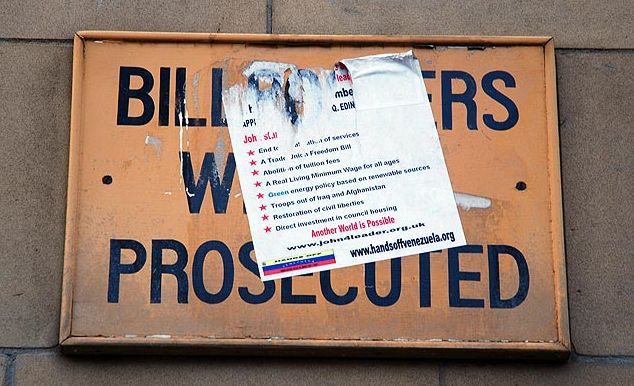
You'll find your local council has laws saying that it's illegal for you to stick posters and advertising on council property - "Bill posters will be prosecuted". Most businesses accept this and don't put their posters and stickers all over signs, traffic lights, bridges, tunnels, etc.

Same here - please do not plaster your adverts/promos in/around the site - please contact us via the feedback page to find out how we can work out together to find a solution for you.

If you see another business advertising, this is not a valid excuse for you to do so. Do you steal because someone does?

Using Seabreeze to advertise other sites (be it your own site, or that of a friend, etc), is not acceptable. Posting about such sites or sending unsolicited PM's about such sites is unacceptable.

Please note that Seabreeze members are a highly suspicious lot who can smell advertising a mile away, so if there is even a hint that your post is just poorly disguised advertising, be prepared to have your post removed and/or for the linked site to be torn to pieces from a review perspective.

Inappropriate posting of business advertising will be removed.

Viral Marketing

Viral marketing is when people are employed (or given equipment "in kind") to promote a company and its products and not revealing their connection to the company and/or products. They also register multiple logins, or enlist associates to engage in a "Question & Answer" session, where the associate asks questions about a brand to setup the other to provide knowledgeable advice (and therefore marketing)

There is also the reverse, where people getting financial reward from a competing product ask leading questions of a competitors products to make it look bad in the hope that it will make their product more appealing. These people go out of their way to directly highlight flaws, or, on occasion, even invent flaws and myths.

It's not illegal, is usually see-through, and can result in angry feelings by those who believed the mystery posters were "ordinary customers". It is particularly dissappointing when these people take time out to degrade competitors and/or competing products via single line posts such as "You wouldn't catch me buying that." type of comment.


These activites are directly against the forum rules and counts as spam.

The common name for such a member (who indirectly promotes their own product) is a Pimp.

If you suspect a member of being a pimp, please let the moderators know, as targeting them is against the rules and makes you subject to moderation (which was not your intent!)

Please refrain from making accusations against companies or individuals within the forums.

Note that occasional positive comments from known members have never been a problem.

Social Networks

Yay! You've got so excited about your sport, that you've gone and created a new facebook group. You're keen to spread the word, and get as many "Likes" as you can .. there's something new!

Pretty much every other week, some enterprising soul does the above, and enthusiastically enters the forums and posts away about how everybody should join their new facebook group, because it's new, and we can share stuff, and it's great, and we can talk, and we can share photos, and ... and .. and ... ummm .. sorry to interrupt your flow of passion, but isn't that what the forums are all about?

Take a breather and realise that you're going to look a bit silly. Everybody here is already having a great chat, and you coming in and telling everybody that they should be chatting somewhere else in an empty room you've just "created" may look a bit silly.

People have been sharing and helping each other in the Seabreeze forums since before facebook was started, so do yourself a favour and get involved locally - contribute, not dilute. Help make the forums are better place, don't tell everybody to go to your "took 30 seconds to create New Social Group", it's embarrassing!

As one person put it, it's like walking into a pub, and yelling out "Hey everybody! A new American pub has opened down the road, and I just booked a table - everybody come with me .. and tell all your friends too!!" .. poor form!

Posting Errors

Crossposting

Posting the same Topic in more than one forum Category is not appropriate. If you can't decide which forum to post it a particular Topic in, just choose the one that most closely matches and see how you go. If you don't think you are getting the right answers, ask a moderator to move the Topic to a more appropriate location at some later point.

Please note that posting new Topics in multiple forums saying "Come look at Topic <insert link here>" is not permitted, and is also considered crossposting.

Duplicates

Sometimes minor glitches can result in a member's post appearing more than once in a topic. Duplicate posts are sometimes removed, but if a member notices that they have posted a duplicate, they should feel free to edit one of them to indicate that a double post occurred.

Off-topic

Ideally, all posts in a given topic should have at least something to do with the topic. Having said that, some topics do have a natural discussion flow to them, which may move the discussion in different directions - while still maintaining a relationship to the topic.

Posting off topic may result in your post being removed, particularly if your post stands out as being off topic compared to the other posts in the topic, or if your post stands to interfere with a line of otherwise on-topic conversation within the topic.

Off-topic Topics

It is also possible for a topic to be considered off-topic for the forum in which it has been posted.

In such cases the topic will normally be moved to a more appropriate forum, or if no appropriate alternative is available, the topic may be deleted.

The Moderators

Moderators have task of monitoring the content of the forums. They aim to read all topics and posts and make assessments on what is and isn't appropriate. Did you know that Moderators are real people? They suffer from late nights, emotional issues (good & bad), and can often speed read topics. What this means is that they aren't some automated perfect computer program that makes the right call every time.

Moderators can delete posts, delete topics, move topics, modify topic titles, close topics to prevent further discussion and remove offensive language from posts.

Moderation is a very "grey" area. For example, a group of 16 year olds who have started their own topic may be having a friendly banter amongst each other, whereas to others to reads like a full on argument.

Alerting the Moderators of inappropriate content

Above each post is a voting system of thumbs up and thumbs down. Simply place your vote to indicate if the post should be pulled.

You'll often see voted posts remaining, competitors often vote other businesses/products down. It may have a large number of thumbs up and thumbs down.

The important thing is that all posts that have a thumbs down indicator are investigated by the moderators. With buckets of new posts entering the system every day, it makes it easy for the moderators to zoom in on inappropriate posts as voted by the forum users. Allow the moderators time to respond. If you're all stirred up about a post, this doesn't mean that a moderator is sitting around awaiting your report so it can be investigated.

Moderation Explanations

Please do not start a new topic asking why a topic was moved, deleted or closed, or why a post was hidden. If you want to know why, PM a moderator, please do not ask the community.

Post Deletion Policy

Posts can and will be deleted if they breach any of the forum rules.

If you believe there was an error, please contact the moderators. The moderators are only human. Send in your feedback.

Topic Deletion Policy

Typically, topics are deleted when they breach the forum rules, by falling into one of the following categories:

- Pointless - the topic contributes no value to the forum;
- Crosspost - the topic was posted to more than one forum;
- Flame baiting - the goal of the topic is to flame or start a fight;
- Duplicate - there is already a topic on the same or very similar topic;
- Off topic - not just for the forum it was posted in, but off topic for Seabreeze;
- Spam - the topic was advertising for a business or was thinly disguised market research;
- For Sale or Wanted to Buy - the topic was posted to ask for offers for buying or selling something (please use eBay or some other auction site);

Topics which do not fall exactly into one of the above categories, but are deemed inappropriate due to their content or nature, will also be deleted.

Topic Closure Policy

Topics will be closed under any of the following circumstances:

- Off topic - the topic is going off topic, but mostly contains useful information;
- Flame war - the topic is turning into a flame war;
- Purpose fulfilled - the purpose of the topic has been fulfilled - the author's question was answered, the topic has become irrelevant, or is descending into an argument/bickering about the meaning of the words people have written (i.e. topic has been lost).

Topics which do not fall exactly into one of the above categories, but are deemed to have reached the end of their useful life, may also be closed. In cases where the reason for closure is not immediately obvious, a moderator will normally post a final message explaining the closure.

Duplicate Logins Policy

We strongly discourage users from creating additional logins for any reason - with the exception of personal accounts used by recognised Site Sponsors.

We use the term "Duplicate Logins " to refer to additional logins created or operated by an existing Seabreeze member. Seabreeze Moderators have the ability to find these logins, through the use of various tools. In general we will ban any additional accounts we find.

Attempts to circumvent this will not looked upon favourably. For each duplicate login we find, all posts from that login may be removed.

If a member chooses to continue to create duplicate logins, and abuse our hospitality, be warned that we will not hesitate to report your breaches to your ISP's abuse department. As almost all ISP "Acceptable Usage Policies" include clauses regarding member behaviour on websites, such a report can result in a warning from your ISP and potentially the termination of your ISP account.


Zero Tolerance Policy

Seabreeze has a policy of Zero Tolerance for certain member behaviour.

Repeated breaches of any rule by an individual can also attract a Zero Tolerance response.

In cases where such breaches occur, the following actions will be taken (at the moderators discretion):

- The post or topic will be deleted, regardless of whether or not the rest of the post or topic is "valid"; and
- The member's login may be banned for a period of time, ranging from 1 week to a permanent ban.
- There will be no emailed notification of suspensions.

Why was I suspended?

Occasionally members don't understand why they get suspended. No amount of explanation by moderators or other members of the community seems to provide an adequate explanation to these people.. After suspension they then want to engage in an email debate demanding immediate access, occassionaly with legal threats.

If this is you, you might need to consider whether this website is for you? You were invited to join on the optimistic hope that you would add to the community, build new friendships, share your knowledge and generally have fun.

The fact is, that if the moderators, through consensus and feedback from the community determine that a members is ruining the experience of other members or generally degrading the forums, our invitation to you to participate will be withdrawn. Otherwise know as 'suspension'.
Just like you can get kicked out of a nightclub for ruining the pleasure of other patrons, you can also be refused access to this site, and repeated attempts to create logins will also be locked out. Please don't behave like the drunk outside the nightclub demanding entry. Walk away, cool down, and come back with a fresh attitude, and you are more than welcome. Creating new logins while under suspension is a surefire way to ensure permanent banning from the site.

Problems with Moderation?

Q. I've had a post or thread removed, should I post about it?

A. Do not create a thread or post complaining about the moderation action. Complaint Topics or posts will be deleted.

Creating multiple Topics or posts complaining about moderation, or creating Topics or posts to abuse or insult moderators, will result in immediate penalties being applied.

Q. If I shouldn't post about the moderation problem, what should I do?

A. The correct first step if you wish to discuss a moderation action, is to politely contact us with your viewpoint.

Moderators are human and are eager to develop good relationships with all forum members.

Moderators understand firstly that they can make mistakes, and secondly that members make mistakes.

They also understand that there can be miscommunication. Approached politely, and with a constructive attitude most issues have been quickly resolved.

Legal Threats Policy

Seabreeze.com.au and the moderators hold the majority of members & businesses on this site in high regard.

With few exceptions, the members & businesses on Seabreeze.com.au conduct themselves in a professional and polite manner, answering questions and responding to criticism with patience and understanding.

This is excellent to see, especially when you consider the downsides of being in the spotlight of forum discussion - such as having your product or actions publicly discussed and dissected by all and sundry, and having every mistake, however small, highlighted for all to see.

Sometimes, members & businesses turn on seabreeze.com.au and make legal threats.

Seabreeze.com.au is more than willing to consider and respond to reasoned, polite requests from members & businesses regarding the removal of posts and threads that break the forum rules, or that are obviously and verifiably inappropriate or defamatory.

However, where Seabreeze.com.au is of the reasonable view that a request/demand is vexatious, it reserves the right to take any or all of the following actions:

* Publication of a news story on the front page of the Seabreeze.com.au site, or a prominently placed announcement thread, or news summarising the legal threats, who has made them and why;
* Banning of the business and all emails under it's domain from this site;
* Banning of any and all future discussions about the person / business / organisation on Seabreeze.com.au.

The Final Word
It's only a forum. Seriously - don't take it too seriously! :-)


In short

Member rating for posts — report separately when content must be removed.

Thumbs let members rate posts. They help surface useful replies and sink junk — they are not a substitute for the report control when something must be removed.

Use them in good faith; vote rings and revenge thumbs are moderated like other bad behaviour.

In short

Report flag alerts moderators — use it for content that should be removed.

There are people who upload or post things that do not belong on a PG community site. Above posts (and in similar places around member content) you will find a report control — historically a small red flag icon.

Use it for content that should be removed (abuse, spam, illegal, etc.). Reports go to moderators; they are not a public downvote.

Related

I'm disgusted with what someone has written, thumbs up/down.

In short

Edits are only allowed for a short time after posting.

Forum posts are editable for a short window after you post (on the order of an hour). After that, the edit control disappears so threads stay stable.

Troubleshooting

If you need a correction later, reply with an update, or ask a moderator via report/Feedback for exceptional cases (e.g. personal info posted by mistake).

In short

Spam gets banned — Feedback to appeal, sans pitch.

Seriously? If you are reading this out of curiosity, good. If you pasted ads for phones, shoes, crypto, or miracle pills, that is spam — and bans follow.

Appeals: Feedback, without the sales pitch.

In short

We moderate — report problems so they get into the queue.

We do. Moderation is not instant on every thread. If you see something that breaks the rules, report it rather than assuming nobody cares.

Also see Forum Rules.

In short

Try My Adverts first; Feedback if you cannot reinstate.

If a sale falls through, you can usually put the advert back up from My Adverts (edit / republish / refresh — follow the controls on the listing).

If the listing was fully removed or credit rules block a free reinstate, check My Adverts for options or contact Feedback with the advert title.

In short

We do not vouch for traders — verify profiles, talk, agree payment/shipping, watch for scams.

Like any classifieds marketplace, Seabreeze publishes adverts — we cannot certify that a buyer or seller is genuine. Reduce risk:

  • Profile age: brand-new accounts pushing urgent deals deserve extra caution.
  • Talk: phone or real-time chat beats endless vague email.
  • Expectations: travel, offshore work, and slow email habits explain ghosts better than rage-refreshing your inbox.
  • Payment & shipping: agree who pays, who ships, and when. Prefer trusted payment platforms’ buyer/seller protection and read their fine print — “PayPal” is not a magic shield.
  • Scams: fake payment screenshots, overpay-and-refund tricks, pressure to use unusual transfer apps, or “ship first to an agent” stories are common. If it feels rushed or off, walk away.
  • Postage insurance: carriers often cap liability; insure anything you cannot afford to lose.

Interstate deals still come down to photos, conversation, and the risk you personally accept.

In short

Sign in and open /Member/MyAdverts to manage your listings.

Your classifieds are managed under My Adverts — not the old Members / My Adverts.aspx pages.

How to do it
  1. Sign in.
  2. Open My Adverts (/Member/MyAdverts), or use the Members menu → My Adverts.
  3. For a filterable grid, use My Adverts list.

From My Adverts you can edit, refresh, or remove a listing. See also how to remove a listing.

In short

Remove listings from /Member/MyAdverts while signed in.

Remove (or end) a listing from My Adverts.

How to do it
  1. Sign in and open /Member/MyAdverts.
  2. Find the advert and choose remove / delete (wording on the page).
  3. Confirm when asked.

If the advert was marked sold or already expired, it may no longer appear in the active list — check filters on My Adverts list.

Related

find my listing, reinstate after a no-show buyer.

In short

Active until sold/removed; use My Adverts to refresh when prompted.

Listings stay available while they are active and not removed — refresh or renew using the controls on My Adverts when the site asks you to.

Sold or removed adverts leave the public listings. Exact refresh intervals can change; trust the dates shown on your advert and My Adverts.

In short

Not a Seabreeze service — get a carrier quote and agree postage between parties.

Seabreeze does not set courier prices. Ask the buyer/seller to agree postage, or get a quote from a carrier of your choice.

We do not maintain a live price list of courier brands here (those links go stale quickly).

In short

Wait for payment to fully clear, then add images from My Adverts.

Image uploads unlock when the listing payment is fully completed — not while a payment is still pending or held.

How to do it
  1. Open My Adverts and check the advert status.
  2. In your PayPal (or other) account, confirm the payment is completed (not Pending / eCheck / under review).
  3. After it clears, reload My Adverts and open the advert to add images.
  4. Still blocked after a completed payment? Feedback with the advert title and payment time.

In short

Check My Adverts, payment status, then Feedback if it never appears.

New and edited adverts can take a short time to show while payment clears and/or the listing is checked.

  • Open My Adverts — if it appears there but not in public search yet, wait a little and refresh.
  • If payment is still pending, finish checkout; unpaid listings stay incomplete.
  • If PayPal (or other) payment shows pending/held, images and public publish can wait until the payment clears — see I paid but can't add images.
  • Still missing after a reasonable wait? Feedback with the advert title and approximate post time.

In short

Check My Adverts and payment status; Feedback if a completed payment never unlocked the listing.

Bank transfer / EFT used to be common; most listings now pay online (e.g. PayPal/card) during publish.

How to do it
  1. Sign in and open My Adverts.
  2. Confirm the advert exists and whether payment shows completed.
  3. If you paid but the advert is still incomplete, wait for the payment provider to clear a pending payment, then reload My Adverts.
  4. If you paid outside the normal checkout flow and nothing appears, contact us via Feedback with the approximate time, amount, and advert title — do not email card numbers.

In short

Optional but spam-prone — prefer on-site contact where you can.

You can include contact details in an advert, but expect spam harvesters to notice.

Prefer the site’s contact / messaging flow where possible. If you must publish an email, consider a dedicated address and never put passwords or payment logins in the ad text.

In short

Ask the uploader; credit them — gallery ≠ public domain.

Each gallery image shows who uploaded it. That member owns the photo unless they state otherwise.

Ask the uploader for permission before reusing an image off-site or in commercial work, and credit them when they agree. “It’s on Seabreeze” is not a blank licence.

In short

Sign in, open your profile/gallery uploads, then edit or delete photos you own.

Gallery uploads are tied to your member account. Use your profile / gallery tools while signed in — not the old Members → My Profile → Details.aspx path.

How to do it
  1. Sign in.
  2. Open your profile from the Members menu (your member name), or browse Gallery and filter to your uploads where the UI allows.
  3. Open a photo you own to edit or delete it. Only the uploader (and site staff) can delete your photos.
Troubleshooting

If you cannot see a delete control, confirm you are signed in as the same member who uploaded the image.

Want to reuse someone else's photo? See using a gallery photo.

In short

See the find/delete gallery photos help article.

This is covered in the manage-photos article.

How do I find or delete photos I've uploaded?

Contact Us

Can't find what you're looking for? Send us a message and we'll get back to you.

We'll use this to get back to you.
If your question is about a specific spot, pick it here.